Interview QA
1. What is Terraform, and what is its primary purpose?
Terraform is an open-source Infrastructure as Code (IaC) tool created by HashiCorp. It allows you to define and manage cloud and on-premises infrastructure using a declarative configuration language called HCL (HashiCorp Configuration Language). Terraform automates provisioning, updating, and versioning infrastructure, to ensure consistency and reduce manual effort.
2. How does Terraform differ from other IaC tools like CloudFormation or Ansible?
Terraform versus CloudFormation: Terraform is cloud-agnostic, meaning it can manage infrastructure across multiple providers (AWS, Azure, GCP, etc.), whereas AWS CloudFormation is specific to AWS. Terraform also has a more flexible syntax and state management.
Terraform versus Ansible: Ansible is primarily a configuration management tool (managing software, packages, and OS configurations), while Terraform focuses on provisioning and managing infrastructure resources declaratively.
3. What are the key Terraform commands, and what do they do?
terraform init– Initializes a Terraform project and downloads necessary provider plugins.terraform plan– Creates an execution plan showing what changes Terraform will apply.terraform apply– Applies the planned changes and provisions resources.terraform destroy– Deletes all managed resources.terraform validate– Checks for syntax errors in the Terraform configuration files.
4. What is a Terraform state file?
Terraform maintains a state file (terraform.tfstate )to track the real-world infrastructure it manages. The state file helps Terraform to understand the current state of resources, detect drift (drift refers to a situation where the actual state of your infrastructure (in the cloud or on-prem) differs from the Terraform state file), and efficiently apply changes. It is crucial for collaboration, but because it contains sensitive data, it should be stored securely.
5. What are Terraform providers, and why are they important?
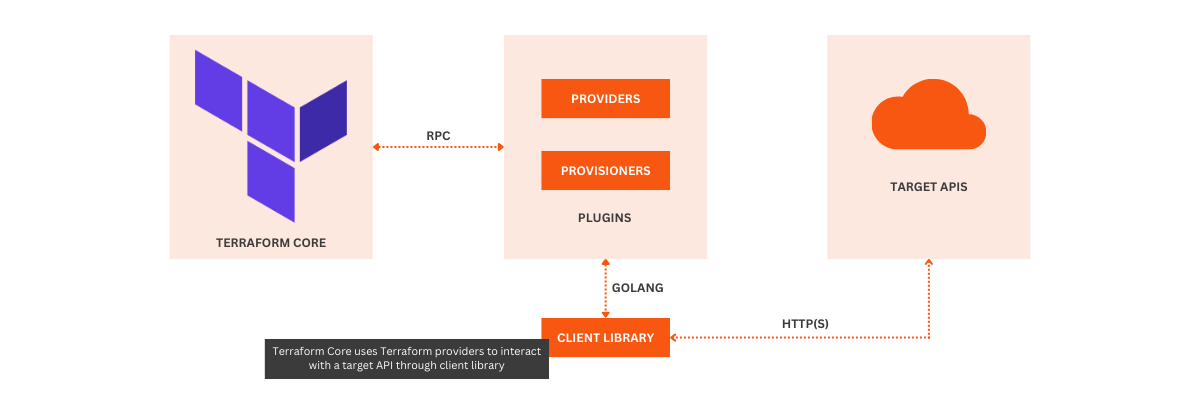
Providers in Terraform are plugins that enable Terraform to interact with cloud platforms, SaaS services, and other APIs. Each provider (e.g., AWS, Azure, Kubernetes) defines the resources that Terraform can manage. Without providers, Terraform wouldn’t know how to create or configure infrastructure resources.
If you want to know more about Terraform and how it works, have a look at this beginner’s guide. In that article, I dive into the key components of Terraform in more detail and go over the pros and cons of the tool. There is even a mini tutorial to get you started with provisioning infrastructure on AWS.
Intermediate Terraform Interview Questions
This section digs deeper into Terraform's workflows, configuration practices, and strategies for managing state and resources in real-world projects. You will need a good amount of practical experience with Terraform to answer these questions, especially if you are asked to talk about specific examples.
6. What are Terraform modules?
Terraform modules are reusable components that help organize infrastructure code by grouping related resources together. They improve maintainability, enable your team to reuse code across projects, and simplify deployments.
A module can be as simple as a directory containing .tf files and an optional variables.tf file!
7. How does Terraform manage remote state?
By default, Terraform stores the state locally, but for collaboration, it supports remote backends (S3 with DynamoDB for AWS, GCS for Google Cloud, or Terraform Cloud). Remote state enables:
Shared access for multiple team members.
State locking to prevent conflicts.
Better security with encryption and controlled access.
8. What are Terraform workspaces, and when should you use them?
Terraform workspaces allow you to maintain separate state files within the same configuration. They are useful when managing multiple environments (like dev, staging, prod) without duplicating code.
Workspaces are best for simple environment separation but may be too difficult to maintain for complex multi-account setups.
Source: DevOps Mojo
9. How does Terraform handle importing existing infrastructure, and what are the limitations?
Terraform can import existing resources into its state using the terraform import command. However, it doesn’t automatically generate configuration files (the .tf files) for those resources, so you’ll need to write them manually.
There are some limitations to this import functionality:
Complex setups require manual configuration reconciliation.
Some resource types are not supported for import.
There is a drift risk if the imported resource configuration doesn’t match actual infrastructure.
10. What are Terraform provisioners, and when should you use them?
Provisioners execute scripts or commands on a resource after it is created. They are often used for tasks like configuring VMs or installing software.
There are two types of provisioners:
Local provisioners, which run on the machine executing Terraform).
Remote provisioners, which run on the target resource via SSH or WinRM.
Since provisioners introduce dependencies and reduce Terraform's declarative nature, they should be used sparingly. An alternative is to use configuration management tools like Ansible or cloud-init.
Source: Opcito
11. What is drift detection in Terraform, and how can it be addressed?
Drift detection refers to the situation when the actual infrastructure state diverges from the state defined in Terraform’s configuration. This can happen when manual changes are made outside of Terraform, like updates in the cloud provider’s console or other automation tools.
Terraform can detect drift by running terraform plan, which compares the current state from the state file with the real infrastructure.
If drift is detected, you should revert the manual changes to match the Terraform configuration, update the configuration to reflect the new desired state and run terraform apply to bring the infrastructure back into alignment with the configuration.
12. How would you implement a rolling update using Terraform for an application deployed in multiple instances?
A rolling update allows you to update your infrastructure incrementally to reduce downtime and make sure that a subset of your application instances remain available during the update. In a rolling update scenario, Terraform creates a new instance of the resource, waits for it to become healthy (using health checks), and then gradually replaces the old instances.
Practically, you can implement a rolling update by defining immutable infrastructure in Terraform and using count or for_each within your resource definitions (e.g., EC2 instances, load balancers).
13. How do you handle resource dependencies in Terraform, and what is the role of implicit and explicit dependencies?
In Terraform, resource dependencies are handled automatically through its graph-building mechanism. Implicit dependencies are created when one resource references another in its configuration (for example, referencing an aws_security_group in an aws_instance) and Terraform automatically infers the dependency order.
Explicit dependencies are useful for handling edge cases where Terraform cannot automatically infer the dependency order. They are created when the depends_on argument is used, which forces Terraform to apply a specific order of execution even when resources are not directly referenced.
Source: HashiCorp
Cloud Courses
Build your Cloud skills with interactive courses, curated by real-world experts.
Advanced Terraform Interview Questions
At the advanced level, interviewers will want to see your expertise in managing large-scale infrastructure with Terraform. The questions might include topics like multi-cloud deployments, collaboration in teams, and automation challenges. This is where you can really showcase your experience and skills, so don’t hesitate to talk about projects you have worked on and give practical examples!
14. How do you manage complex multi-cloud deployments with Terraform?
Managing multi-cloud environments requires handling multiple providers in one configuration. Terraform allows you to configure resources from different cloud providers (e.g., AWS, Azure, Google Cloud) in the same main.tf file by specifying different providers and using provider-specific resources.
You can use provider aliases to manage multiple instances of the same provider (e.g., AWS in different regions), and leverage modules to abstract common configurations and prevent duplication. Make sure you manage cross-cloud dependencies carefully though, because resources in different clouds might not have direct relationships.
15. What are the taint and untaint commands in Terraform? How would you use them in a real-world scenario?
terraform taint marks a resource for recreation the next time terraform apply is run, even if there are no changes to the configuration. This is useful when a resource has become problematic or is in an undesirable state.
For example, if an EC2 instance fails and needs to be recreated, you can taint it to trigger its destruction and recreation during the next apply.terraform untaint is used to undo the taint command and prevent the resource from being recreated.
16. What is Terraform Cloud and Terraform Enterprise, and what are their key differences?
Terraform Cloud is a SaaS offering from HashiCorp that provides collaboration features, such as remote state management, workspace management, version control integration, and policy enforcement. It's ideal for small to medium teams.
Terraform Enterprise is a self-hosted version that adds more advanced features like private module registries, more granular access controls, and advanced security features, including on-premise deployments.
In short: Terraform Cloud is hosted and maintained by HashiCorp, while Terraform Enterprise is self-hosted and gives organizations full control over their infrastructure.
Source: Google Cloud
17. How do you manage state locking and concurrency issues in Terraform when working with large teams?
State locking in Terraform is meant to prevent two users from modifying the same state simultaneously because that can lead to corrupted state files.
Terraform Cloud and Enterprise automatically handles state locking using a backend.
For remote backends like S3 with DynamoDB, Terraform uses DynamoDB for state locking and to prevent concurrency issues.
18. What are zero-downtime deployments, and how can Terraform achieve them?
Zero-downtime deployments happen when applying changes to infrastructure without interrupting the availability of services. Terraform can achieve this through strategies like:
Blue-Green deployment: Using two identical environments (Blue and Green), where you switch traffic between them to deploy changes without downtime.
Rolling updates: Gradually applying changes to a small subset of instances at a time, allowing the rest to remain active during updates.
These are common strategies in cloud architecture and Terraform provides features that can help implement them. However, fully implementing these zero-downtime strategies often requires additional tools, like load balancers.
19. How do you handle secrets management in Terraform, and what are the best practices?
Terraform itself doesn’t manage secrets but can integrate with external secrets management tools. For example, you can use:
HashiCorp Vault: Terraform has built-in support for Vault to retrieve secrets like API keys or passwords at runtime, ensuring they aren’t hardcoded in configuration files.
Environment variables: For sensitive values, you can set them as environment variables.
Remote backends with encryption: Store state files in remote backends with encryption enabled to prevent unauthorized access to sensitive data.
Use of sensitive argument: Mark outputs and variables as sensitive to prevent them from appearing in Terraform plan/apply logs.
20. How do you implement custom Terraform providers, and when would you need one?
Custom Terraform providers are used when you need to manage resources or services that Terraform doesn’t natively support. They are implemented in Go and involve creating custom functions that interact with APIs or services that aren't covered by existing providers, like an in-house API, a niche cloud service, or a proprietary technology.
Terraform provides the Terraform Plugin SDK to help you build providers, but you’ll need to handle authentication, CRUD (Create, Read, Update, Delete) operations, and any special configuration specific to the API you’re interacting with.
How Can You Manage Terraform State Efficiently?
Use remote backends, such as S3 or GCS, to store the Terraform state file. This enables collaboration and ensures state consistency when working in teams. Lock the state using DynamoDB or GCS to prevent simultaneous state modifications.
Example:
2. Why Should You Use Version Control with Terraform?
Version control helps track changes to your Terraform configurations, allowing you to roll back to previous versions if necessary. Use Git repositories to manage your .tf files and follow a branch strategy to handle updates.
Example:
Use
gitfor tracking infrastructure changes
3. How Can You Modularize Terraform Configurations?
Breaking Terraform configurations into reusable modules ensures better code organization, reduces duplication, and simplifies updates.
Example:
4. What Are the Best Practices for Handling Sensitive Data in Terraform?
Avoid hardcoding secrets in Terraform code. Use environment variables or secret management tools like AWS Secrets Manager or HashiCorp Vault to securely handle sensitive information.
Example:
5. How Can You Structure Your Terraform Code for Different Environments?
Separate environments (e.g., dev, staging, production) by using different directories, workspaces, or variables. This keeps configurations for each environment isolated and prevents unintended changes.
Example:
6. Why Should You Use terraform fmt and terraform validate?
Use terraform fmt to ensure consistent formatting of your Terraform code and terraform validate to catch syntax errors before applying changes.
Example:
7. What Are the Best Practices for Writing Output Values in Terraform?
Use output values to expose information from your modules or state. Avoid outputting sensitive information like secrets. Ensure that outputs are relevant and meaningful for debugging or downstream usage.
Example:
8. How Do You Perform Drift Detection in Terraform?
Drift occurs when the actual infrastructure differs from what is defined in the Terraform state. Use terraform plan regularly to detect and manage drift, ensuring infrastructure remains as intended.
Example:
9. Why Should You Use Provider Version Pinning?
Always pin provider versions to prevent unexpected changes when a provider is updated. This ensures stability across different environments and team members.
Example:
10. What Are the Best Practices for Terraform Workspaces?
Use workspaces to manage multiple environments (e.g., dev, staging, production) within the same Terraform configuration. However, workspaces are best suited for minor environment differences, not for entirely separate infrastructure.
Example:
Last updated