Sonarqube stage
Setup and Integration part available at technologies > azure > azure devops > getting started
this section covers basics understanding
A Bug is code that can break the application at runtime or produce wrong behavior.
A Vulnerability is code that can be exploited by an attacker.
A Code Smell does not break the app and is not a security risk, but it:
Makes code hard to maintain
Increases future bug risk
Focus: Maintainability
Code Coverage: How much of your code is executed by automated tests.
A Security Hotspot is Code that might be insecure depending on how it is used.
Duplication measures: Repeated blocks of identical or very similar code.
SAST, DAST, CVE, OWASP
Great fundamentals question 👍 These 4 terms are the backbone of AppSec / DevSecOps. I’ll explain each clearly, with simple examples, and how they connect in real projects.
1️⃣ SAST – Static Application Security Testing
🔍 What is SAST?
SAST scans source code without running the application to find security issues early.
Happens at code time
White-box testing (has code visibility)
🧠 Example
String query = "SELECT * FROM users WHERE id=" + userInput;➡️ SAST flags SQL Injection risk
🛠️ Tools (examples)
SonarQube
Checkmarx
Fortify
🎯 Best for
Developers
Pre-merge checks
CI pipelines
2️⃣ DAST – Dynamic Application Security Testing
🔍 What is DAST?
DAST tests a running application from outside, like an attacker.
Black-box testing
No access to source code
🧠 Example
Sends malicious input to
/loginTries XSS, SQLi, auth bypass
Observes runtime behavior
🛠️ Tools
OWASP ZAP
Burp Suite
🎯 Best for
QA / Security teams
Staging or production testing
3️⃣ OWASP – Open Web Application Security Project
🔍 What is OWASP?
OWASP is a non-profit organization that publishes security standards & awareness.
OWASP does NOT scan your code.
🔥 OWASP Top 10
A list of the most critical web security risks, like:
Injection
Broken Authentication
Sensitive Data Exposure
Security Misconfiguration
🧠 Why tools reference OWASP
SonarQube, Snyk, Trivy map issues to OWASP
Helps with compliance & audits
4️⃣ CVE – Common Vulnerabilities and Exposures
🔍 What is CVE?
A CVE is a unique ID for a known security vulnerability.
Example:
CVE-2023-34362🧠 What CVE tells you
What is vulnerable
Which version is affected
Severity (via CVSS score)
🎯 Used by
Trivy
Snyk
NVD (National Vulnerability Database)
🔄 How they connect (very important)
OWASP defines risks
   ↓
SAST finds OWASP issues in code
   ↓
DAST finds OWASP issues at runtime
   ↓
CVE tracks known vulnerable components📊 Quick Comparison Table (Interview Gold)
SAST
Static code scan
Source code
Build time
DAST
Runtime attack scan
Running app
Test / Prod
OWASP
Security standard
Nothing
Reference
CVE
Vulnerability ID
Packages
Continuous
🎯 One-Line Interview Answers
SAST: “Analyzes source code to find security issues early.”
DAST: “Tests a running app like an attacker.”
OWASP: “Defines common web security risks.”
CVE: “A unique ID for known vulnerabilities.”
🚀 Real DevSecOps Setup (Best Practice)
Git commit
  ↓
SAST (SonarQube)
  ↓
Build image
  ↓
CVE scan (Trivy / Snyk)
  ↓
Deploy to staging
  ↓
DAST (OWASP ZAP)
If you want next:
🔹 SAST vs DAST vs IAST
🔹 CVSS severity explained
🔹 OWASP Top 10 mapped to Sonar rules
🔹 Real CI/CD YAML examples
Just say next 👌
Quality gates types
Quality Gate Types in SonarQube — When to Use Which

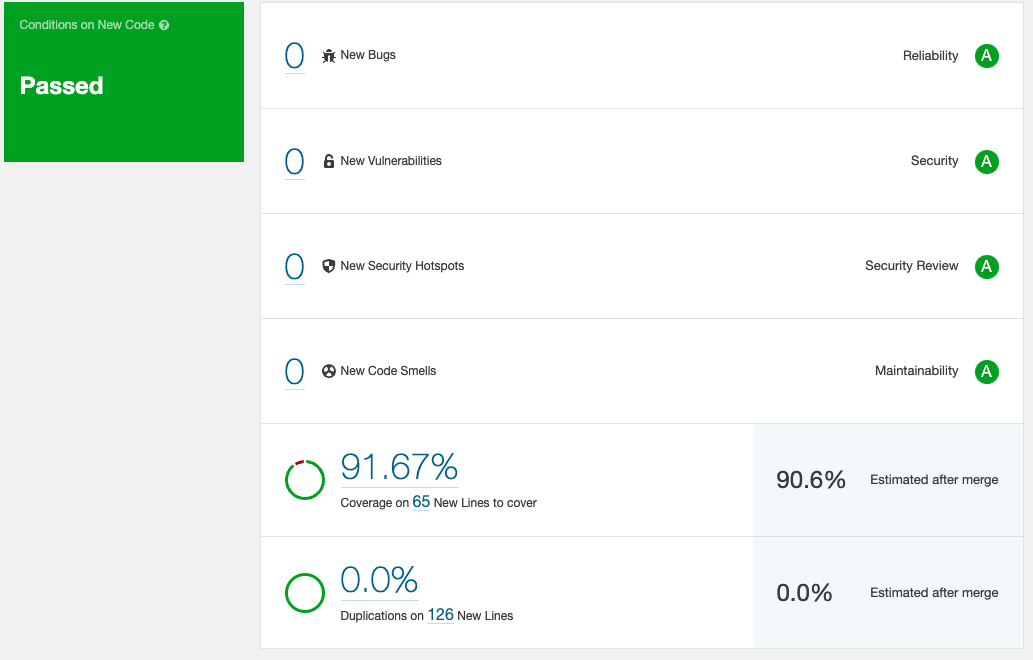
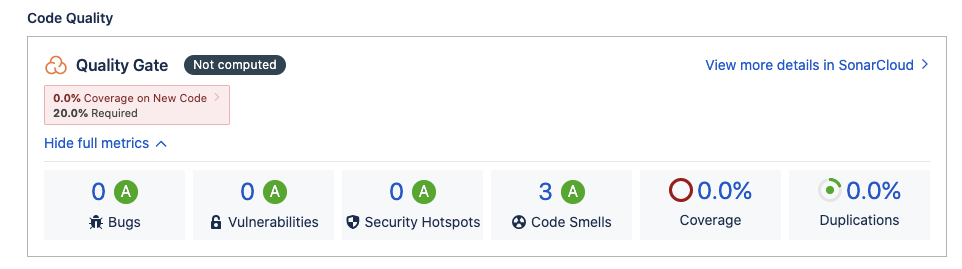
Quality Gate Type
What It Checks
Typical Conditions
When to Use (Best Fit)
Default (Sonar Way)
Focuses mainly on New Code
New Bugs = 0New Vulnerabilities = 0Coverage ≥ 80%Duplication ≤ 3%
✅ Standard choice for most teams✅ CI/CD pipelines✅ Agile & DevOps environments
New Code Quality Gate
Only code added/changed recently
Bugs = 0Vulnerabilities = 0Security Hotspots reviewed = 100%
✅ Legacy projects✅ Gradual quality improvement✅ Preventing new technical debt
Overall Code Quality Gate
Entire codebase (old + new)
Overall coverage ≥ 80%Total bugs ≤ threshold
✅ Small / greenfield projects❌ Large legacy codebases
Security-Focused Gate
Security issues & hotspots
Vulnerabilities = 0No Critical/Blocker issues
✅ Banking / FinTech apps✅ Public APIs✅ Compliance-driven teams
Reliability-Focused Gate
Runtime stability
Reliability rating = ANew bugs = 0
✅ Backend services✅ High-availability systems
Maintainability-Focused Gate
Technical debt & code smells
Maintainability rating = ADebt ratio < 5%
✅ Long-lived products✅ Large engineering teams
Pull Request (PR) Gate
Changed code in PRs only
Bugs = 0Coverage on changed code ≥ 80%
✅ GitHub / GitLab PR checks✅ Shift-left quality
Branch-Specific Gate
Code in a specific branch
Same as New Code or PR rules
✅ main / release branches✅ Controlled releases
Custom Quality Gate
Team-defined rules
Flexible thresholds
✅ Different service criticality✅ Microservices with different SLAs
Quick Recommendation Matrix
Scenario
Recommended Quality Gate
Legacy monolith
New Code Gate
New microservice
Sonar Way
Production-critical API
Security + Reliability Gate
CI/CD enforcement
PR Gate
Long-term maintainability
Maintainability Gate
Golden Rule (Real-World DevOps Practice)
❝ Never block deployments because of old code — block them because of new mistakes ❞
If you want next:
Exact metrics used in each gate
Sample Quality Gate JSON-style config
How to map Quality Gates to environments (dev / stage / prod)

bugs
A Bug is code that is likely to cause incorrect behavior, crashes, data loss, or security issues at runtime.
Real-world examples shown in images
NullPointerException risk
Array index out of bounds
Incorrect loop condition
Resource leak
Infinite loop
Action:
Used by: Developers, SRE
📌 Action: Fix immediately, pipeline fails if severity is high
Developer fixes logic
QA adds regression tests


vulnerabilities
Real-world examples
SQL Injection
Command Injection
Hardcoded credentials
Insecure crypto usage
📌 Used by: Security, DevOps
📌 Action: Block release, mandatory fix

where is , why and how to fix by sonarqube

sonar vs trivy vs snyk
This is a very common DevOps / SRE interview question 👍 I’ll explain SonarQube vs Trivy vs Snyk clearly, with what they scan, how they work, and when to use which.
🧰 What problem do these tools solve?
All three help detect security vulnerabilities, but at different layers of the software supply chain.
🔑 They complement each other — they do NOT replace each other.
1️⃣ SonarQube – Code-level vulnerabilities
🔍 What SonarQube scans
Source code
Business logic
Secure coding issues
🛠️ How it works
Static Application Security Testing (SAST)
Analyzes code without running it
Uses rules based on CWE / OWASP
🚨 What it finds
Hard-coded credentials
SQL injection risks
Weak crypto usage
Insecure API usage
❌ What it does NOT scan
OS packages
Container images
Open-source dependency CVEs
🎯 Best use
Developers
Pre-merge checks
Code reviews
2️⃣ Trivy – Image & infrastructure vulnerabilities
🔍 What Trivy scans
Container images
OS packages
Language dependencies
Kubernetes configs
IaC (Terraform, Helm)
🛠️ How it works
CVE-based scanning
Uses vulnerability databases (NVD, vendor feeds)
🚨 What it finds
Vulnerable Linux packages
Vulnerable npm/pip/maven libs
Misconfigured Kubernetes YAML
Secrets inside images
❌ What it does NOT scan
Application business logic
Code correctness issues
🎯 Best use
CI/CD pipelines
Container security
Shift-left image scanning
3️⃣ Snyk – Dependency + code security
🔍 What Snyk scans
Open-source dependencies
Containers
IaC
(Limited) source code
🛠️ How it works
CVE + exploit maturity analysis
Deep dependency graph analysis
🚨 What it finds
Vulnerable libraries (transitive deps)
Known exploits
Container image CVEs
IaC misconfigurations
❌ What it does NOT focus on
Code quality
Maintainability issues
🎯 Best use
Developers
Dependency security
Open-source risk management
🔄 Comparison Table (🔥 interview gold)
Scan Type
SAST
Image / OS CVE
Dependency CVE
Scans Source Code
✅ Yes
❌ No
⚠️ Limited
Scans Containers
❌ No
✅ Yes
✅ Yes
Scans Dependencies
❌ No
✅ Yes
✅ Best
IaC Scanning
❌ No
✅ Yes
✅ Yes
Finds Logic Bugs
✅ Yes
❌ No
❌ No
Free Tier
Community
Fully free
Limited
CI/CD Friendly
✅ Yes
✅ Yes
✅ Yes
🧠 When to use which (real-world setup)
🔹 Use SonarQube when:
You want secure & clean code
You care about code quality
You want Quality Gates before merge
🔹 Use Trivy when:
You build Docker images
You deploy to Kubernetes
You want fast, free CVE scans
🔹 Use Snyk when:
You use many open-source libraries
You want dependency risk visibility
You want auto-fix PRs
🚀 Ideal DevSecOps Pipeline (Best Practice)
🎯 Interview One-Liner (🔥)
“SonarQube finds code-level security issues, Trivy finds container and OS CVEs, and Snyk focuses on dependency vulnerabilities. They solve different layers of security.”
If you want next:
🔹 Which tool fails pipeline and why
🔹 Severity mapping (Sonar vs CVSS)
🔹 How to reduce false positives
🔹 Jenkins / GitHub Actions examples
Just say next 🚀
Sonarqube rules

Short answer: these rules are DEFAULT SonarQube rules, not custom-created ones.
Let me explain clearly using your screenshot 👇
✅ Are these rules default or custom?
The rule “Credentials should not be hard-coded” (and others you highlighted) is:
👉 A built-in default rule provided by SonarQube
You did NOT create this rule manually.
🔍 Why this rule exists by default
SonarQube ships with predefined rule sets for each language (Java, Python, JS, etc.), based on:
OWASP
CWE (Common Weakness Enumeration)
Secure coding best practices
SonarSource research
Your rule belongs to:
Language: Java
Type: Security → Vulnerability
Category: Responsibility (Clean Code attribute)
Standard: CWE mapped
Source: SonarSource default rule catalog
That’s why you see:
🔒 Security | Vulnerability | CWE | Deactivate
🧠 Why your code triggered this rule
In your code:
SonarQube detected:
Hard-coded credentials
High risk if pushed to repo / production
Common real-world security mistake
Hence the rule:
“Credentials should not be hard-coded”
🔧 Can this rule be changed or removed?
Yes — but carefully.
You can:
❌ Deactivate the rule (not recommended)
⚠️ Lower severity
✅ Exclude specific files
🟢 Fix the code (best practice)
Example fix:
🧩 Difference: Default Rule vs Custom Rule
Created by
SonarSource
You / Org
Visible by default
✅ Yes
❌ No
CWE / OWASP mapping
✅ Yes
Usually No
Shown as “Deactivate”
✅ Yes
Shows owner
Recommended
✅ Strongly
Depends
Your screenshot clearly shows a default responsibility rule.
🎯 Interview-ready answer (important)
“This rule is a built-in SonarQube security vulnerability rule. SonarQube provides it by default based on CWE and secure coding standards to detect hard-coded credentials.”
If you want, next I can explain:
🔐 Why this is a Vulnerability, not a Bug
🧩 Why Security Rating is still A
⚙️ How Quality Profiles control these rules
🚀 How this affects CI/CD Quality Gates
Just tell me 👍


Last updated